

|
|
|
deegree Web Catalogue Service
v.2.1
|
lat/lon GmbH Aennchenstr. 19 53177 Bonn Germany Tel ++49 - 228 - 184 96-0 Fax ++49 - 228 - 184 96-29 info@lat-lon.de www.lat-lon.de |
Dept. of Geography Bonn University Meckenheimer Allee 166 53115 Bonn
|
Change log
|
Date |
Description |
Author |
|---|---|---|
|
2007-01-10 |
Update using new formatting style |
Markus Müller |
|
2007-03-12 |
Adding Harvester Functionality |
Hans Plum |
|
2007-03-12 |
Enhancing Harvester Functionality |
Andreas Poth |
|
2007-03-12 |
Improving Delete Operation for Harvester |
Hans Plum |
|
2007-03-13 |
Adding general description of deegree CS-W capabilities; Some reformatting. |
Markus Müller |
|
2007-03-13 |
Adding Configuration of DB schema for CSW |
Hans Plum |
|
2007-03-13 |
Editorial changes; adding examples for setting Java-parameters for Tomcat |
Andreas Poth |
|
2007-03-15 |
Editorial changes. |
Markus Müller |
|
2007-03-08 |
Updates on ISO19115 example for demo v2.1 rc1 |
Hanko Rubach |
Table of Contents
2.2 deegree Web Catalogue Service release 7
2.3 Setting up the example database 7
2.4 Testing the installation 8
4.1 Structure of the configuration files 16
4.2 The deegree CS-W configuration document 16
4.2.2 ServiceIdentification 17
5.1 Manual Tomcat integration 20
5.2 Setting up the Harvester 23
5.2.1 Setting up the database 23
5.2.2 Activating harvesting functionality 24
5.2.3 Testing the harvester 25
5.3 Request and response formatting using XSLT 28
Appendix A Example CS-W configuration document 39
Appendix B deegree WFS configuration for accessing example metadatasets 42
Index of Tables
Table 1: Directory structure of the CSW release 7
Illustration Index
Figure 1: deegree CS-W architecture 15
Figure 2 File dependencies for deegree CSW configuration 16
Figure 3: Tomcat console on a Windows OS 25
deegree is a Java Framework offering the main building blocks for Spatial Data Infrastructures (SDIs). Its entire architecture is developed using standards of the Open Geospatial Consortium (OGC) and ISO Technical Committee 211 – Geographic information / Geoinformatics (ISO/TC 211). deegree encompasses OGC Web Services as well as clients. deegree is Free Software protected by the GNU Lesser General Public License (GNU LGPL) and is accessible at http://www.deegree.org.
deegree2 is the new release of deegree supporting a number of features that deegree1 was not able to handle. This documentation describes setup and configuration of the deegree Web Catalogue Service (CSW), an implementation of OGC's Catalogue Service Implementation Specification 2.0.0 and the ISO 19115 / 19119 Application Profile 0.9.3.
deegree's Web Catalogue Service implementation (Catalogue Service – Web profile, therefore CS-W) is able to serve different metadata formats in parallel based on the same physical datastore. This is possible because deegree CS-W uses XSLT processing to transform requests as well as responses into the desired format. deegree CS-W does not contain its a data access modul of its own. It uses an OGC WFS (at the moment limited to deegree WFS) as datasource. So in future it will be possible to use deegree CS-W on top of any other OGC compliant WFS to offer catalogue functionalities.
As deegree WFS is extremely flexible in regard to supporting different database schemas, it is possible to adjust deegree CS-W to almost any existing metadata base – without the need for replication.
Besides the CSW, deegree comprises a number of additional services and clients. A complete list of deegree components can be found at:
http://www.lat-lon.de → Products
Downloads of packaged deegree components can be found at:
http://www.deegree.org → Download
deegree's Web Catalogue Service offers great flexibility regarding it's configuration and output formats. It works with a wide range of physical data sources and server environments. The configuration of CSW is similar to the configuration of other deegree Web Services and requires the editing of XML files which control the functionality of the server.
deegree CS-W is an implementation of the OpenGIS® Catalogue Services Specification 2.0 - ISO19115/ISO19119 Application Profile for CSW 2.0 version 0.9.3 (in short: ISO APP; OGC project document 04-038r2). It supports the operations:
GetCapabilities
DescribeRecord
GetRecords
GetRecordByID
Transaction and
Harvest
It even extends the Harvest-operation by the possibility to harvest other Catalogue Serivces as a whole (a behaviour not specified by the ISO APP and the CS-W 2.0 specification).
The web services of deegree are realized as Java modules controlled by one central servlet (the “dispatcher”). This servlet has to be deployed to the respective web server/servlet engine. Most of the common web servers support servlet technology, thus making deegree a universal product. The Apache-Tomcat 5.5 Servlet-Engine is recommended due to its widespread use and its status as an open-source product.
For deegree2 Web Catalogue Service to run you need:
Java (JRE or JSDK) version 1.5.x
Tomcat 5.5.x
PostgreSQL 8.0 + PostGIS 1.0.x
For installation of these components refer to the corresponding documentation at java.sun.com tomcat.apache.org, http://www.postgresql.org/ and http://www.postgis.org/.
deegree Web Catalogue Service can be downloaded
from http://www.deegree.org. The release is packed as a WAR-archive.
Simply put this file into your $TOMCAT_HOME$/webapps
directory and (re-)start Tomcat. The installation of deegree WFS is
already done with this.
Note:
It is also possible to extract the WAR archive into another place of
your computer and direct Tomcat to this place. Because of this
possibility, in the remainder of this document, the directory you
extracted the files to is referred to as $csw_home$
(=$TOMCAT_HOME$/webapps/deegree-csw
in the standard case).
Your $csw_home$ will contain the following structure:
|
directory |
Content |
|
./client |
contains the generic client for testing |
|
./WEB-INF |
Required by Tomcat, containing all libraries, configuration- and data-files |
|
./WEB-INF/conf/csw |
WFS configuration files |
|
./WEB-INF/conf/scripts |
contains DB create scripts, Format converter ESRI metadata file -> ISO |
Table 1: Directory structure of the CSW release
Create a database within PostgreSQL with UTF-8 Encoding (consult the according PostgreSQL and PostGIS documentation). After that execute the according SQL script create_database.sql located in $csw_home$/WEB-INF/conf/scripts.
Then you have to connect the catalogue against the PostgreSQL instance in the file WEB-INF/conf/csw/featuretypes/csw.xsd like this, where csw is the name of your database:
<xsd:appinfo>
<deegreewfs:Prefix>app</deegreewfs:Prefix>
<deegreewfs:Backend>POSTGIS</deegreewfs:Backend>
<deegreewfs:DefaultSRS>EPSG:4326</deegreewfs:DefaultSRS>
<JDBCConnection xmlns="http://www.deegree.org/jdbc">
<Driver>org.postgresql.Driver</Driver>
<Url>jdbc:postgresql://localhost:5432/csw</Url>
<User>USERNAME</User>
<Password>PASSWORD</Password>
<SecurityConstraints/>
<Encoding>iso-8859-1</Encoding>
</JDBCConnection>
<deegreewfs:SuppressXLinkOutput>true</deegreewfs:SuppressXLinkOutput>
</xsd:appinfo>
The deegree CS-W demo download comes pre-configured for accessing a Postgis database. The database can be filled with a few example metadataset to enable to perform a few example requests. Metadata datasets will find it's way into the database via a Transaction Insert request which can be sent via the generic client located under the url http://yourservername:port/deegree-csw/client/client.html. Go to the 'Request' dropdown menue, choose 'Transaction' -> 'inert_all.xml' and finally 'Send' the Transaction request. For further testing you have two options. Some example requests for demonstration of the principle behavior of the service will be explained in the following sections. You can also use the generic client to communicate with the CS-W. Just check out the example requests in the dropdown menue.
request 1:
http://my.server.domain/deegree-csw/services?SERVICE=CSW&ACCEPTVERSION=2.0.0&REQUEST=GetCapabilities
result:
<?xml version="1.0" encoding="UTF-8"?>
<csw:Capabilities xmlns:csw="http://www.opengis.net/cat/csw"
xmlns:deegree="http://www.deegree.org/csw" xmlns:ogc="http://www.opengis.net/ogc"
xmlns:ows="http://www.opengis.net/ows" xmlns:xlink="http://www.w3.org/1999/xlink"
xmlns:xsi="http://www.w3.org/2001/XMLSchema-instance" updateSequence="0" version="2.0.0">
<ows:ServiceIdentification>
<ows:ServiceType>CSW</ows:ServiceType>
<ows:ServiceTypeVersion>2.0.0</ows:ServiceTypeVersion>0
<ows:Title>deegree 2.1 CSW test</ows:Title>
<ows:Abstract>abstract</ows:Abstract>
<ows:Keywords>
<ows:Keyword>deegree</ows:Keyword>
</ows:Keywords>
<ows:Fees>NO FEES - IT'S FREE</ows:Fees>
<ows:AccessConstraints>NONE</ows:AccessConstraints>
</ows:ServiceIdentification>
<ows:ServiceProvider>
<ows:ProviderName>lat/lon GmbH</ows:ProviderName>
<ows:ProviderSite xlink:href="http://www.latlon.de" xlink:type="simple" />
<ows:ServiceContact>
<ows:IndividualName />
<ows:ContactInfo>
<ows:Phone>
<ows:Voice>++49 228 18496-0</ows:Voice>
<ows:Facsimile>++49 228 18496-29</ows:Facsimile>
</ows:Phone>
<ows:Address>
<ows:DeliveryPoint>Aennchenstr. 19</ows:DeliveryPoint>
<ows:DeliveryPoint>basement</ows:DeliveryPoint>
<ows:City>Bonn</ows:City>
<ows:AdministrativeArea>NRW</ows:AdministrativeArea>
<ows:PostalCode>53177</ows:PostalCode>
<ows:Country>Germany</ows:Country>
<ows:ElectronicMailAddress>info@lat-lon.de</ows:ElectronicMailAddress>
</ows:Address>
<ows:OnlineResource xlink:href="http://localhost:8080/deegree-csw/services"
xlink:type="simple" />
<ows:HoursOfService>9am-17pm</ows:HoursOfService>
<ows:ContactInstructions>personal</ows:ContactInstructions>
</ows:ContactInfo>
<ows:Role>PointOfContact</ows:Role>
</ows:ServiceContact>
</ows:ServiceProvider>
<ows:OperationsMetadata>
<ows:Operation name="GetCapabilities">
<ows:DCP>
<ows:HTTP>
<ows:Get xlink:href="http://localhost:8080/deegree-csw/services"
xlink:type="simple" />
</ows:HTTP>
</ows:DCP>
</ows:Operation>
<ows:Operation name="DescribeRecord">
<ows:DCP>
<ows:HTTP>
<ows:Get xlink:href="http://localhost:8080/deegree-csw/services"
xlink:type="simple" />
<ows:Post xlink:href="http://localhost:8080/deegree-csw/services"
xlink:type="simple" />
</ows:HTTP>
</ows:DCP>
<ows:Parameter name="typeName">
<ows:Value>csw:dataset</ows:Value>
<ows:Value>csw:datasetcollection</ows:Value>
<ows:Value>csw:application</ows:Value>
<ows:Value>csw:service</ows:Value>
</ows:Parameter>
<ows:Parameter name="outputFormat">
<ows:Value>text/xml</ows:Value>
</ows:Parameter>
<ows:Parameter name="schemaLanguage">
<ows:Value>XMLSCHEMA</ows:Value>
</ows:Parameter>
</ows:Operation>
<ows:Operation name="GetRecords">
<ows:DCP>
<ows:HTTP>
<ows:Post xlink:href="http://localhost:8080/deegree-csw/services"
xlink:type="simple" />
</ows:HTTP>
</ows:DCP>
<ows:Parameter name="typeName">
<ows:Value>csw:dataset</ows:Value>
<ows:Value>csw:datasetcollection</ows:Value>
<ows:Value>csw:application</ows:Value>
<ows:Value>csw:service</ows:Value>
</ows:Parameter>
<ows:Parameter name="outputFormat">
<ows:Value>text/xml</ows:Value>
</ows:Parameter>
<ows:Parameter name="outputSchema">
<ows:Value>DublinCore</ows:Value>
<ows:Value>csw:profile</ows:Value>
</ows:Parameter>
<ows:Parameter name="resultType">
<ows:Value>RESULTS</ows:Value>
</ows:Parameter>
<ows:Parameter name="elementSetName">
<ows:Value>brief</ows:Value>
<ows:Value>summary</ows:Value>
<ows:Value>full</ows:Value>
</ows:Parameter>
</ows:Operation>
<ows:Operation name="GetRecordById">
<ows:DCP>
<ows:HTTP>
<ows:Get xlink:href="http://localhost:8080/deegree-csw/services"
xlink:type="simple" />
<ows:Post xlink:href="http://localhost:8080/deegree-csw/services"
xlink:type="simple" />
</ows:HTTP>
</ows:DCP>
</ows:Operation>
<ows:Operation name="Transaction">
<ows:DCP>
<ows:HTTP>
<ows:Post xlink:href="http://localhost:8080/deegree-csw/services"
xlink:type="simple" />
</ows:HTTP>
</ows:DCP>
</ows:Operation>
</ows:OperationsMetadata>
<ogc:Filter_Capabilities>
<ogc:Spatial_Capabilities>
<ogc:Spatial_Operators>
<ogc:BBOX />
</ogc:Spatial_Operators>
</ogc:Spatial_Capabilities>
<ogc:Scalar_Capabilities>
<ogc:Logical_Operators />
<ogc:Comparison_Operators>
<ogc:Like />
</ogc:Comparison_Operators>
<ogc:Arithmetic_Operators>
<ogc:Simple_Arithmetic />
</ogc:Arithmetic_Operators>
</ogc:Scalar_Capabilities>
</ogc:Filter_Capabilities>
</csw:Capabilities>
request2:
http://my.server.domain/deegree-csw/services?SERVICE=CSW&ACCEPTVERSION=2.0.0&REQUEST=GetCapabilities&Sections=OperationsMetadata
result:
<?xml version="1.0" encoding="UTF-8"?>
<csw:Capabilities xmlns:csw="http://www.opengis.net/cat/csw"
xmlns:deegree="http://www.deegree.org/csw" xmlns:ogc="http://www.opengis.net/ogc"
xmlns:ows="http://www.opengis.net/ows" xmlns:xlink="http://www.w3.org/1999/xlink"
xmlns:xsi="http://www.w3.org/2001/XMLSchema-instance" updateSequence="0" version="2.0.0">
<ows:OperationsMetadata>
<ows:Operation name="GetCapabilities">
<ows:DCP>
<ows:HTTP>
<ows:Get xlink:href="http://localhost:8080/deegree-csw/services"
xlink:type="simple" />
</ows:HTTP>
</ows:DCP>
</ows:Operation>
<ows:Operation name="DescribeRecord">
<ows:DCP>
<ows:HTTP>
<ows:Get xlink:href="http://localhost:8080/deegree-csw/services"
xlink:type="simple" />
<ows:Post xlink:href="http://localhost:8080/deegree-csw/services"
xlink:type="simple" />
</ows:HTTP>
</ows:DCP>
<ows:Parameter name="typeName">
<ows:Value>csw:dataset</ows:Value>
<ows:Value>csw:datasetcollection</ows:Value>
<ows:Value>csw:application</ows:Value>
<ows:Value>csw:service</ows:Value>
</ows:Parameter>
<ows:Parameter name="outputFormat">
<ows:Value>text/xml</ows:Value>
</ows:Parameter>
<ows:Parameter name="schemaLanguage">
<ows:Value>XMLSCHEMA</ows:Value>
</ows:Parameter>
</ows:Operation>
<ows:Operation name="GetRecords">
<ows:DCP>
<ows:HTTP>
<ows:Post xlink:href="http://localhost:8080/deegree-csw/services"
xlink:type="simple" />
</ows:HTTP>
</ows:DCP>
<ows:Parameter name="typeName">
<ows:Value>csw:dataset</ows:Value>
<ows:Value>csw:datasetcollection</ows:Value>
<ows:Value>csw:application</ows:Value>
<ows:Value>csw:service</ows:Value>
</ows:Parameter>
<ows:Parameter name="outputFormat">
<ows:Value>text/xml</ows:Value>
</ows:Parameter>
<ows:Parameter name="outputSchema">
<ows:Value>DublinCore</ows:Value>
<ows:Value>csw:profile</ows:Value>
</ows:Parameter>
<ows:Parameter name="resultType">
<ows:Value>RESULTS</ows:Value>
</ows:Parameter>
<ows:Parameter name="elementSetName">
<ows:Value>brief</ows:Value>
<ows:Value>summary</ows:Value>
<ows:Value>full</ows:Value>
</ows:Parameter>
</ows:Operation>
<ows:Operation name="GetRecordById">
<ows:DCP>
<ows:HTTP>
<ows:Get xlink:href="http://localhost:8080/deegree-csw/services"
xlink:type="simple" />
<ows:Post xlink:href="http://localhost:8080/deegree-csw/services"
xlink:type="simple" />
</ows:HTTP>
</ows:DCP>
</ows:Operation>
<ows:Operation name="Transaction">
<ows:DCP>
<ows:HTTP>
<ows:Post xlink:href="http://localhost:8080/deegree-csw/services"
xlink:type="simple" />
</ows:HTTP>
</ows:DCP>
<ows:Parameter name="outputSchema">
<ows:Value>DublinCore</ows:Value>
<ows:Value>csw:profile</ows:Value>
</ows:Parameter>
</ows:Operation>
</ows:OperationsMetadata>
</csw:Capabilities>
request3:
http://my.server.domain/deegree-csw/services?request=DescribeRecord&version=2.0.0&outputFormat=text/xml&schemaLanguage=XMLSCHEMA&typeName=csw:Record&namespace=csw:http://www.opengis.org/csw
result:
<?xml version="1.0" encoding="UTF-8"?>
<csw:DescribeRecordResponse xmlns:csw="http://www.opengis.net/cat/csw"
xmlns:ogc="http://www.opengis.net/ogc" xmlns:xsi="http://www.w3.org/2001/XMLSchema-instance"
xsi:schemaLocation="http://www.opengis.net/cat/csw http://schemas.opengis.net/csw/2.0.0/CSW-discovery.xsd">
<csw:SchemaComponent schemaLanguage="XMLSCHEMA" targetNamespace="http://www.deegree.org/csw">
<xs:schema xmlns:smXML="http://metadata.dgiwg.org/smXML"
xmlns:tns="http://schemas.opengis.net/iso19115full"
xmlns:xs="http://www.w3.org/2001/XMLSchema" attributeFormDefault="unqualified"
elementFormDefault="qualified"
targetNamespace="http://schemas.opengis.net/iso19115full">
<xs:import namespace="http://metadata.dgiwg.org/smXML"
schemaLocation="./smXML/metadataEntity.xsd" />
<xs:import namespace="http://www.opengis.net/cat/csw"
schemaLocation="./csw2.0/record.xsd" />
<xs:import namespace="http://schemas.opengis.net/iso19119"
schemaLocation="./iso19119.xsd" />
<xs:complexType name="MD_Metadata_Type">
<xs:complexContent>
<xs:extension base="csw:AbstractRecordType">
<xs:sequence>
<xs:element minOccurs="0" name="fileIdentifier"
type="smXML:CharacterString_PropertyType" />
<xs:element minOccurs="0" name="language"
type="smXML:CharacterString_PropertyType" />
<xs:element minOccurs="0" name="characterSet"
type="smXML:MD_CharacterSetCode_PropertyType" />
<xs:element minOccurs="0" name="parentIdentifier"
type="smXML:CharacterString_PropertyType" />
<xs:element maxOccurs="unbounded" minOccurs="0" name="hierarchyLevel"
type="smXML:MD_ScopeCode_PropertyType" />
<xs:element maxOccurs="unbounded" minOccurs="0"
name="hierarchyLevelName" type="smXML:CharacterString_PropertyType" />
<xs:element maxOccurs="unbounded" name="contact"
type="smXML:CI_ResponsibleParty_PropertyType" />
<xs:element name="dateStamp" type="smXML:Date_PropertyType" />
<xs:element minOccurs="0" name="metadataStandardName"
type="smXML:CharacterString_PropertyType" />
<xs:element minOccurs="0" name="metadataStandardVersion"
type="smXML:CharacterString_PropertyType" />
<xs:element maxOccurs="unbounded" name="identificationInfo"
type="smXML:_MD_Identification_PropertyType" />
<xs:element maxOccurs="unbounded" minOccurs="0" name="dataQualityInfo"
type="smXML:DQ_DataQuality_PropertyType" />
<xs:element maxOccurs="unbounded" minOccurs="0"
name="spatialRepresentationInfo"
type="smXML:_MD_SpatialRepresentation_PropertyType" />
<xs:element maxOccurs="unbounded" minOccurs="0"
name="referenceSystemInfo"
type="smXML:MD_ReferenceSystem_PropertyType" />
<xs:element maxOccurs="unbounded" minOccurs="0" name="contentInfo"
type="smXML:_MD_ContentInformation_PropertyType" />
<xs:element minOccurs="0" name="distributionInfo"
type="smXML:MD_Distribution_PropertyType" />
</xs:sequence>
</xs:extension>
</xs:complexContent>
</xs:complexType>
<xs:element name="MD_Metadata" substitutionGroup="csw:AbstractRecord"
type="tns:MD_Metadata_Type" />
<xs:complexType name="MD_Metadata_PropertyType">
<xs:choice>
<xs:element ref="tns:MD_Metadata" />
<xs:element ref="smXML:Reference" />
</xs:choice>
</xs:complexType>
</xs:schema>
</csw:SchemaComponent>
</csw:DescribeRecordResponse>
As mentioned above deegree CS-W doesn't contain any direct data access modules. It uses deegree WFS through its API or – in future releases – any OGC WFS its their web interface. So deegree CS-W can be seen as a kind of facade on top a WFS offering components for transforming incoming catalogue requests into WFS requests and transforming WFS responses into CS-W responses.
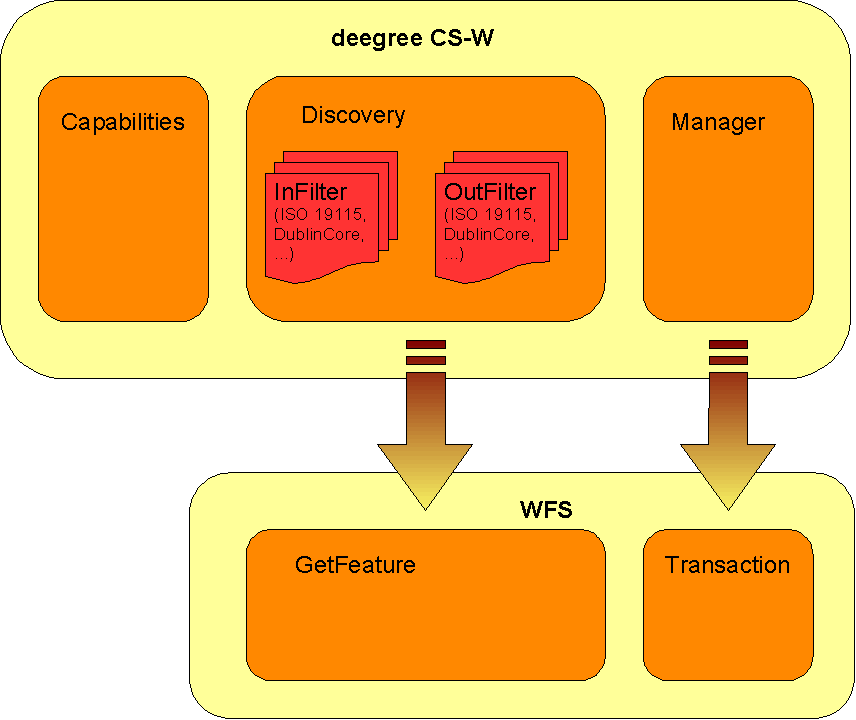
Figure
1: deegree CS-W architecture
Figure 1 shows
the dependency between deegree CS-W and a WFS acting as its
datasource. Because transformation modules/scripts are located on the
CS-W side it is possible to offer several metadata formats/schemas on
top of the same WFS FeatureType.
The following figure shows the relationships between the different configuration files that have to be adjusted:
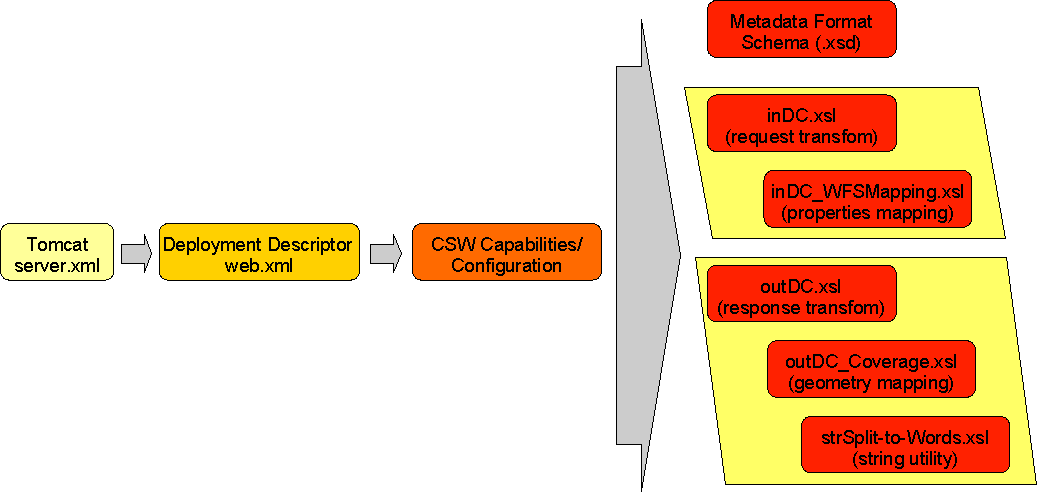
Figure
2 File dependencies for deegree CSW configuration
The basic configuration allows usage of the full set of parameters that can be used for controlling the deegree CS-W. This includes the parameters mentioned in the OGC CS-W 2.0.0 specification for the Capabilities document, but also additional technical parameters.
In the following, the elements of the configuration file (an extended Capabilties document) will be described in detail. It is located at $csw_demo$/WEB-INF/conf/csw/csw_capabilities.xml. Appendix A includes an example of a complete configuration/capabilities document.
The <DefaultOnlineResource> is the URL by which the CS-W operations can be invoked. This parameter can be overwritten by the URLs defined in the request-definitions. Both parameters are mandatory. You have to adjust the <DefaultOnlineResource> to your system.
<deegree:deegreeParams>
<deegree:DefaultOnlineResource xlink:type="simple" xlink:href="http://localhost:8080/deegree-csw/services"/>
<deegree:CacheSize>100</deegree:CacheSize>
<deegree:RequestTimeLimit>60</deegree:RequestTimeLimit>
<deegree:Encoding>ISO-8859-1</deegree:Encoding>
<deegree:TransactionInputXSLT xlink:type="simple" xlink:href="transaction.xsl"/>
<deegree:TransactionOutputXSLT xlink:type="simple" xlink:href="transactionOut.xsl"/>
<!-- this parameter will be used to define the default schema used by the catalogue if OUTPUTSCHEMA parameter is missing. According to CS-W specification this must be OGCCORE which is not useful for GetRecordById requests -->
<deegree:DefaultOutputSchema>csw:profile</deegree:DefaultOutputSchema>
<deegree:WFSResource xlink:type="simple" xlink:href="wfs_capabilities.xml"/>
</deegree:deegreeParams>
The <CacheSize> parameter defines the size of the cache available to deegree-CS-W in megabyte. This parameter is optional, its default value is 100 MB. By <RequestTimeLimit> the maximum time span is defined in seconds after which a request has to be processed. If this value is exceeded the processing is cancelled and an exception will be thrown. Its default value is 30 seconds. The encoding element defines the default character encoding to be used within the catalogue if embedded sources doesn't provide encoding informations. This element is optional, default value is 'UTF-8'.
Because deegree CS-W uses a WFS as datasource one must define the WFS to be used. This is done by setting the WFSResource element. If it's missing it is assumed that a file named 'wfs_capabilities.xml' is available in the same directory as the catalogue capabilities file. deegree CS-W also uses this element to determine if a WFS is 'local' or 'remote'. A 'local' WFS will be connected through the deegree API; a 'remote' WFS uses HTTP connections defined by the OGC WFS 1.0.0 specification. A WFS will be handled as being 'local' if the capabilities document is referenced by a file URL or a relative path. Using a HTTP URL will force treating a WFS as 'remote'.
The ServiceIdentification section is required for giving basic informations about the a CS-W to the client/user. This information may be used to manage several catalogues within one client or to store a catalogue metadata in another catalogue. For details see OGC Catalogue Service 2.0.0 and the OWS Common specification.
<ows:ServiceIdentification>
<ows:ServiceType>CSW</ows:ServiceType>
<ows:ServiceTypeVersion>2.0.0</ows:ServiceTypeVersion>
<ows:Title>deegree v2.1 demo CSW</ows:Title>
<ows:Abstract>abstract</ows:Abstract>
<ows:Keywords>
<ows:Keyword>deegree</ows:Keyword>
</ows:Keywords>
<ows:Fees>NO FEES - IT'S FREE</ows:Fees>
<ows:AccessConstraints>NONE</ows:AccessConstraints>
</ows:ServiceIdentification>
This section provides informations about the person(s) and organisation(s) making a catalogue available. For details see OGC Catalogue Service 2.0.0 and the OWS Common specification.
The OperationsMetadata sections provides information about each operation offered by a catalogue. Mainly these are the names of the operations and the parameters that have to be passed to them. Each parameter can be assigned to a list of possible values. At the moment deegree CS-W supports GetCapabilities, GetRecords, DescribeRecord, GetRecordById, Transaction and Harvest operations.
For the parameter 'outputSchema' of the GetRecords operation deegree introduces two additional attributes.
<ows:Parameter name="outputSchema">
<ows:Value deegree:input="inDC.xsl" deegree:output="outDC.xsl">DublinCore</ows:Value>
<ows:Value deegree:input="in_csw_profile.xsl" deegree:output="out_csw_profile.xsl">csw:profile</ows:Value>
</ows:Parameter>
The first additional attribute 'deegree:input' references a XSLT script that will be used to transform an incoming GetRecord request into a GetFeature request that will be understood by the underlying WFS. Vice versa the script referenced by 'deegree:output' transforms the feature collection returned from the WFS into a XML document that validates against the schema referenced by 'deegree:schema' attribute of the typeName parameter.
<ows:Parameter name="typeName">
<ows:Value deegree:schema="iso19115_be_bb_full.xsd">csw:dataset</ows:Value>
<ows:Value deegree:schema="iso19115_be_bb_full.xsd">csw:datasetcollection</ows:Value>
<ows:Value deegree:schema="iso19115_be_bb_full.xsd">csw:application</ows:Value>
<ows:Value deegree:schema="iso19119.xsd">csw:service</ows:Value>
</ows:Parameter>
This always should be referenced through an HTTP URL even if a relative path or a FILE URL is valid too. This schema will also be returned when performing a DescribeRecord request agaist a type. Details about how to construct the in- and out-scripts will be discussed below.
For general information on how to define service operations in a catalogues capabilities document see OGC Catalogue Service 2.0.0 and OWS Common specification.
The last section of the capabilities document contains a description of the capabilities of the filter functions offered by a catalogue. You can leave this as it comes with the demo installation because this represents the current capabilities of the deegree Filter Encoding implementation. For details see OGC Catalogue Service 2.0.0, OWS Common and Filter Encoding specification.
The location of deegree's libraries and the central deegree configuration file csw_capabilities.xml should be registered with the Servlet Engine (in this case Apache Tomcat 5.5). Tomcat offers several possibilities to register and configure web contexts.
The
easiest way to register deegree web services with Tomcat is to copy
the deegree-csw.war file
to the
$TOMCAT_HOME$/webapps
directory. You can do this either with running or stopped tomcat. If
the tomcat is started afterwards, the application should be
automatically deployed. Tomcat will unpack the deegree-wfs.war file
(which is nothing more than a .zip file) to the webapps directory
automatically. The name of the .war sets the name of the service
address:
http://localhost:8080/deegree-csw
If you want to do the Tomcat installation process manually use the steps described in the following.
Unpack the deegree-csw.war to a directory (e.g. c:/deegree/webapps/deegree-csw) of your choice.
Afterwards Tomcat needs information about the root directory of the WFS. The easiest way is to create a XML-file in the directory $TOMCAT_HOME$/conf/Catalina/localhost, named the same as the service e.g. deegree-wfs.xml, and fill it with the following information
<Context docBase="c:/deegree/webapps/deegree-csw" path="/deegree-csw">
</Context>
where the docBase attribute reflects the physical location of the deegree service in the file system and the path attribute describes the virtual location of the main directory of the deegree web service. In the example, the root directory of the service is accessible at http://my.server.domain/deegree-csw/. For further information have a look at the Tomcat documentation included with the installation.
The name of the deegree-service directory is arbitrary whereas Tomcat definitely looks for a subdirectory WEB-INF (in capital letters – even on a Windows system) in the root directory. You will find this directory after tomcat automatically unpacked the war archive. Here the Deployment-Descriptor (web.xml) is located, which is analysed by Tomcat to identify the servlet(s) belonging to the application, their names, the parameters that are delivered to the servlet(s) and information about the existing access restrictions.
Before starting deegree WFS the following dataset entry in web.xml is essential:
<?xml version="1.0" encoding="ISO-8859-1"?>
<!DOCTYPE web-app PUBLIC "-//Sun Microsystems, Inc.//DTD Web Application 2.2//EN"
"http://java.sun.com/j2ee/dtds/web-app_2.2.dtd">
<web-app>
<description>deegree v2.1 demo CSW</description>
<filter>
<filter-name>SOAPFilter</filter-name>
<filter-class>org.deegree.enterprise.servlet.SOAPFacadeServletFilter</filter-class>
</filter>
<servlet>
<servlet-name>services</servlet-name>
<servlet-class>org.deegree.enterprise.servlet.OGCServletController</servlet-class>
<init-param>
<param-name>services</param-name>
<param-value>csw</param-value>
<description>list of supported services, e.g.: wfs,wms (comma separated) allways use lowercase</description>
</init-param>
<init-param>
<param-name>wfs.handler</param-name>
<param-value>org.deegree.enterprise.servlet.WFSHandler</param-value>
</init-param>
<init-param>
<param-name>wfs.config</param-name>
<param-value>WEB-INF/conf/csw/wfs_capabilities.xml</param-value>
</init-param>
<init-param>
<param-name>csw.handler</param-name>
<param-value>org.deegree.enterprise.servlet.CSWHandler</param-value>
</init-param>
<init-param>
<param-name>csw.config</param-name>
<param-value>WEB-INF/conf/csw/csw_capabilities.xml</param-value>
</init-param>
<load-on-startup>1</load-on-startup>
</servlet>
<!--
<filter-mapping>
<filter-name>SOAPFilter</filter-name>
<url-pattern>/services</url-pattern>
</filter-mapping>
-->
<servlet-mapping>
<servlet-name>services</servlet-name>
<url-pattern>/services</url-pattern>
</servlet-mapping>
<welcome-file-list>
<welcome-file>welcome.html</welcome-file>
<welcome-file>index.jsp</welcome-file>
</welcome-file-list>
</web-app>
The name of the servlet and of the java-class representing the servlet should be indicated in the <servlet> tags. The servlet-name can be user defined, but care should be taken that the same name that is defined here is also used in the servlet-mapping. The servlet is located in the deegree2.jar library.
The tag <init-param> defines parameters that are analyzed by the servlet, while initializing. The transferred parameters are
'services': The value of this parameter contains a comma separated list of OWS that will be made available through the context. In the example only a 'csw' is defined to be available (other possible values at the moment are: wfs, wcs, sos, wpvs and csw).
For each service listed in the 'service' init-param a handler class and a configuration file must be referenced.
The name of the init-param for defining the handler starts with the service name ('wfs' in the example) followed by '.handler'. The value of this parameter is the name of the handler class to be used. It is possible to write a different class for this and reference it accordingly. As default ' org.deegree.enterprise.servlet.WFSHandler' should be used.
The name of the init-param for defining the main configuration file of a service also starts with the service name followed by '.config'. Notice that you can use a relative path to the configuration file starting at the WEB-INF directory of the context.
If you want to make more than one service available through a servlet context, web.xml looks like this (the example defines a 'wms' as well as a 'wfs' and if you uncomment the WCS section even this one is accessible):
<?xml version="1.0" encoding="ISO-8859-1"?>
<!DOCTYPE web-app PUBLIC "-//Sun Microsystems, Inc.//DTD Web Application 2.2//EN"
"http://java.sun.com/j2ee/dtds/web-app_2.2.dtd">
<web-app>
<description>deegree v2.1 demo CSW</description>
<filter>
<filter-name>SOAPFilter</filter-name>
<filter-class>org.deegree.enterprise.servlet.SOAPFacadeServletFilter</filter-class>
</filter>
<servlet>
<servlet-name>services</servlet-name>
<servlet-class>org.deegree.enterprise.servlet.OGCServletController</servlet-class>
<init-param>
<param-name>services</param-name>
<param-value>csw,wfs</param-value>
<description>
list of supported services, e.g.: wfs,wms (comma separated) allways use lowercase
</description>
</init-param>
<init-param>
<param-name>wfs.handler</param-name>
<param-value>org.deegree.enterprise.servlet.WFSHandler</param-value>
</init-param>
<init-param>
<param-name>wfs.config</param-name>
<param-value>WEB-INF/conf/csw/wfs_capabilities.xml</param-value>
</init-param>
<init-param>
<param-name>csw.handler</param-name>
<param-value>org.deegree.enterprise.servlet.CSWHandler</param-value>
</init-param>
<init-param>
<param-name>csw.config</param-name>
<param-value>WEB-INF/conf/csw/csw_capabilities.xml</param-value>
</init-param>
<load-on-startup>1</load-on-startup>
</servlet>
<!--
<filter-mapping>
<filter-name>SOAPFilter</filter-name>
<url-pattern>/services</url-pattern>
</filter-mapping>
-->
<servlet-mapping>
<servlet-name>services</servlet-name>
<url-pattern>/services</url-pattern>
</servlet-mapping>
<welcome-file-list>
<welcome-file>welcome.html</welcome-file>
<welcome-file>index.jsp</welcome-file>
</welcome-file-list>
</web-app>
In case you wish to run more than on deegree service, it es recommended to use the deegree-wms.war as this configuration already includes the services wfs,wcs and wms.
The tag <servlet-mapping> defines the alias name for the servlet. It is not necessary that the <servlet-name> and <url-pattern> are identical. <url-pattern> is the name for the parameter the servlet will be called through (part of the base-URL of the service that all requests have to use). Combined with the path settings in $TOMCAT_HOME$/conf/Catalina/localhost/deegree-csw.xml and respectively the name of the .war which you deployed in the $TOMCAT_HOME$/webapps (in our example deegree-csw) you should be able to point to your WFS (OWS) via the following URL: http://my.server.domain/deegree-csw/services?
deegree CS-W supports harvesting capability as defined by the ISO APP extended by the possibility to harvest entire catalogues. The installation and configuration of this harvesting capability is described in the following.
Before the harvester can be activated, some additional tables have to be added to the CSW database. Execute the harvester.SQL file (located in $csw_home$/WEB-INF/conf/scripts/ on your CSW PostgreSQL/Postgis database. This will create 4 tables that can be used for managing the harvesting jobs, and to keep track of the metadata records belonging to the according CSW.
Afterwards you have to point the harvester to its database tables. Therefore, you have to adapt the properties file in the deegree2.jar in the following way:
Unzip the WEB-INF/lib/deegree2.jar in a temporary directory
Create a directory named
$csw_home$/WEB-INF/classes/org/deegree/ogcwebservice/csw/manager
Copy the file
org/deegree/ogcwebservice/csw/manager/harvestrepository.properties
(from the unzipped jar) to
$csw_home$/WEB-INF/classes/org/deegree/ogcwebservice/csw/manager
and adapt the database connection there.
In order to activate the harvesting functionality for the CSW, you have to use the deployment descriptor WEB-INF/web_harvester.xml and rename it to web.xml (Be careful: make a backup copy of the original web.xml file).
The major difference to a deployment descriptor of a none harvesting CSW are following entries:
<web-app>
<context-param>
<param-name>CSW.config</param-name>
<param-value>
/WEB-INF/conf/csw/csw_capabilities.xml
</param-value>
</context-param>
<listener>
<listener-class>
org.deegree.enterprise.servlet.CSWHarvestingContextListener
</listener-class>
</listener>
...
These parameters force the assigned tomcat context to use a special listener that is called during initialization and shutdown of the catalogue service.
Because the harvester informs the “contractor” of the harvesting operations via eMail, you have to configure a SMTP connection for the catalogue service. Therefore, you have to set the following property for tomcat: “-DmailHost=SERVERNAME”. How this has to be done depends on the way how you have installed your Tomact and how you start it:
a) Tomcat is installed/started as service on a Windows OS: Open the Apache Tomcat configuration console and add the mailHost parameter to the Java Options:
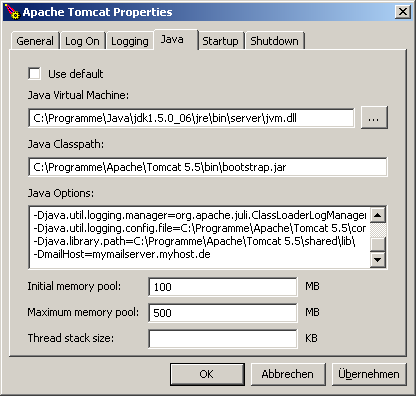
Figure
3: Tomcat console on a Windows OS
b) Tomcat is installed/started as service on a Linux/Unix OS: Set JAVA_OPTS in $TOMCAT_HOME$/bin/catalina.sh
export JAVA_OPTS="-Xmx500m -Xms100m -DmailHost=SERVERNAME"
c) Tomcat ist started directly (e.g using a batch file): Set the option in the Java call:
java.exe -Xms100m -Xmx500m -jar -DmailHost=mymailhost.myhost.de -DCHARSET="UTF-8" -Duser.dir="C:\Programme\Apache\Tomcat 5.5" "C:\Programme\Apache\Tomcat 5.5\bin\bootstrap.jar" start
The following request shows a request that starts harvesting of a full catalog http://www.google.de/ue. This functionality is deegree-specific an not defined by the ISO APP (only harvesting of single metadata files is defined there).
|
Description |
|
|
|
|
|
|
|
|
address of the CSW that is going to be harvested |
|
|
This is a vendor-specific enhancement: Because CSW spec does not specifiy a way to harvest an entire CSW, deegree uses “catalogue” as paramete. |
|
|
|
|
|
eMail-address all logging messages go to for this harvest-request |
|
|
Period conforming to ISO8601 Period syntax. |
|
|
For further information, please consult the OGC CSW 2.0 specification. |
|
OGC CSW 2.0 specification does not specify an operation for deleting jobs for harvesting through its interface. In order to delete a harvesting job, you have to follow 2 steps:
Delete
the job out of the related harvester tables harvestersource,
metadatacache, jt_source_responsehandler, reponsehandler within one
transaction
The following SQL statements need to be executed
step-by-step on the harvester DB:
--execute
everything in one transaction
begin;
--
find id of the desired harvestsource
select
id from harvestsource where source =
'http://HOSTNAME:PORTNUMMBER/aCatalogue/services';
--
find all related id's in responsehandler belonging to the source's
id
select
fk_responsehandler from jt_source_responsehandler where
fk_harvestsource = ID OF DESIRED HARVESTSOURCE;
delete from
jt_source_responsehandler where fk_harvestsource = SOURCE-ID;
delete
from responsehandler where id = <LIST OF fk_harvestsource>;
--
figure out all records with their fileidentifiers in the
metadatacache belonging to the harvestsource
select
fileidentifier from metadatacache where id = ID of
harvestsource;
delete from metadatacache where id = ID of
harvestsource;
commit;
Using the list of fileidentifiers you have to
delete all stored records in the CSW repository through the CSW
Transaction Interface via HTTP POST. A request like this is shown in
the following:
<?xml-stylesheet type="text/xsl"?>
<csw:Transaction service="CSW" version="2.0.0" xmlns:csw="http://www.opengis.net/cat/csw" xmlns:gml="http://www.opengis.net/gml" xmlns:iso19115="http://schemas.opengis.net/iso19115full" xmlns:iso19115brief="http://schemas.opengis.net/iso19115brief" xmlns:smXML="http://metadata.dgiwg.org/smXML" xmlns:ogc="http://www.opengis.net/ogc">
<csw:Delete>
<csw:Constraint version="1.0.0">
<ogc:Filter>
<ogc:PropertyIsLike wildCard="%" singleChar="_" escape="\">
<ogc:PropertyName>./iso19115:fileIdentifier/ smXML:CharacterString</ogc:PropertyName>
<ogc:Literal>FILEIDENTIFIERS</ogc:Literal>
</ogc:PropertyIsLike>
</ogc:Filter>
</csw:Constraint>
</csw:Delete>
If you want to edit the harvestsource, you first have to delete all according metadata records for that harvestsource-id like described above . Then changing of the harvestsource works like this:
update harvestersource set source = 'NEW CATALOGUE URL' where id = 'ID OF THE SOURCE TO BE CHANGED';
SQL: execute step by step
--
find the accordind foreign keys for the harvestsource in the join
table
select fk_responsehandler from jt_source_responsehandler
where fk_harvestresource = ID;
update reponsehandler set address =
'NEW EMAILADDRESS' where id = fk_reponsehandler and isEmailAdress =
1;
Send a harvestrequest with a file URL against the service:
Be aware that this file gets harvested once and will remain in the metadata repository until it is deleted manually via the CSW transaction interface (using delete).
As mentioned above deegree CS-W needs to transform incoming GetRecords requests to WFS GetFeature requests and resulting WFS GML Feature Collections to the requested metadata outputSchema. For this behavior for each supported metadata format/schema two XSLT scripts must be defined, one for input/requests and on for output/responses. The following example explains what those scripts must do. Other than in the demo release where the ISO 19115 schema is configured the next section descibes the pricipally same DublinCore schema as supported metadata format and a deegree WFS serving a feature type named 'DublinCoreProduct' having the following GML application schema:
<?xml version="1.0" encoding="UTF-8"?>
<xs:schema targetNamespace="http://www.lat-lon.de"
xmlns:xs="http://www.w3.org/2001/XMLSchema" xmlns:gml="http://www.opengis.net/gml"
xmlns:xlink="http://www.w3.org/1999/xlink" xmlns:ll="http://www.lat-lon.de"
elementFormDefault="qualified">
<!-- import GML 2.1.2 schema definitions -->
<xs:import namespace="http://www.opengis.net/gml"
schemaLocation="./feature.xsd"/>
<xs:import namespace="http://www.opengis.net/gml"
schemaLocation="./geometry.xsd"/>
<!-- ========================================== -->
<!-- element definition -->
<!-- ========================================== -->
<xs:element name="FeatureCollection" type="ll:DCFeatureCollectionType"
substitutionGroup="gml:_FeatureCollection"/>
<xs:complexType name="csw:Record">
<xs:complexContent>
<xs:extension base="gml:AbstractFeatureType">
<xs:sequence>
<xs:element name="csw:DUBLINCORE.IDENTIFIER" type="xs:string"
minOccurs="0"/>
<xs:element name="csw:DUBLINCORE.CONTRIBUTOR" type="xs:string"
minOccurs="0"/>
<xs:element name="csw:DUBLINCORE.CREATOR" type="xs:string"
minOccurs="0"/>
<xs:element name="csw:DUBLINCORE.PUBLISHER" type="xs:string"
minOccurs="0"/>
<xs:element name="csw:DUBLINCORE.SUBJECT" type="xs:string"
minOccurs="0"/>
<xs:element name="csw:DUBLINCORE.DESCRIPTION" type="xs:string"
minOccurs="0"/>
<xs:element name="csw:DUBLINCORE.RELATION" type="xs:string"
minOccurs="0"/>
<xs:element name="csw:DUBLINCORE.SOURCE" type="xs:string"
minOccurs="0"/>
<xs:element name="csw:DUBLINCORE.RIGHTS" type="xs:string"
minOccurs="0"/>
<xs:element name="csw:DUBLINCORE.FORMAT" type="xs:string"
minOccurs="0"/>
<xs:element name="csw:DUBLINCORE.TYPE" type="xs:string"
minOccurs="0"/>
<xs:element name="csw:DUBLINCORE.TITLE" type="xs:string"/>
<xs:element name="csw:DUBLINCORE.DATE" type="xs:date" minOccurs="0"/>
<xs:element name="csw:DUBLINCORE.LANGUAGE" type="xs:string"
minOccurs="0"/>
<xs:element name="csw:DUBLINCORE.COVERAGE"
type="gml:GeometryPropertyType" minOccurs="0"/>
</xs:sequence>
</xs:extension>
</xs:complexContent>
</xs:complexType>
<xs:complexType name="DCFeatureCollectionType">
<xs:complexContent>
<xs:extension base="gml:AbstractFeatureCollectionType">
<xs:sequence/>
</xs:extension>
</xs:complexContent>
</xs:complexType>
</xs:schema>
For details about how to configure a deegree WFS please have a look to deegree WFS demo and documentation.
According to OGC CS-W specification and the DublinCore schema a valid GetRecord request asking for all metadata objects describing a product having a subject that contains the literal 'pollution' looks like this:
<?xml version="1.0" encoding="UTF-8"?>
<csw:GetRecords xmlns:ogc="http://www.opengis.net/ogc"
xmlns:csw="http://www.opengis.net/cat/csw" version="2.0.0" service="CSW"
outputFormat="text/xml" outputSchema="OGCCORE">
<csw:Query typeNames="csw:Record">
<csw:ElementName>subject</csw:ElementName>
<csw:ElementName>title</csw:ElementName>
<csw:ElementName>date</csw:ElementName>
<csw:Constraint>
<ogc:Filter>
<ogc:PropertyIsLike wildCard="%" singleChar="_" escape="\">
<ogc:PropertyName>subject</ogc:PropertyName>
<ogc:Literal>%structure%</ogc:Literal>
</ogc:PropertyIsLike>
</ogc:Filter>
</csw:Constraint>
</csw:Query>
</csw:GetRecords>
The respective GetFeature request to be performed against the underlying WFS (see schema above) must look like:
<?xml version="1.0" encoding="UTF-8"?>
<wfs:GetFeature outputFormat="text/xml; subtype=gml/3.1.1"
xmlns:csw="http://www.opengis.net/cat/csw" xmlns:fo="http://www.w3.org/1999/XSL/Format" xmlns:gml="http://www.opengis.net/gml"
xmlns:ogc="http://www.opengis.net/ogc" xmlns:wfs="http://www.opengis.net/wfs"
xmlns:xsi="http://www.w3.org/2001/XMLSchema-instance">
<wfs:Query typeName="csw:Record">
<wfs:PropertyName>csw:DUBLINCORE.IDENTIFIER</wfs:PropertyName>
<wfs:PropertyName>csw:DUBLINCORE.TITLE</wfs:PropertyName>
<wfs:PropertyName>csw:DUBLINCORE.SUBJECT</wfs:PropertyName>
<ogc:Filter>
<ogc:PropertyIsLike escape="!" singleChar="#" wildCard="*">
<ogc:PropertyName>csw:DUBLINCORE.SUBJECT</ogc:PropertyName>
<ogc:Literal>*structure*</ogc:Literal>
</ogc:PropertyIsLike>
</ogc:Filter>
</wfs:Query>
</wfs:GetFeature>
If you have a close look to the the GetRecords and the GetFeature request above you see that their structure is more or less identical. Only the name of the request differs; the typeName of the GetFeature Query must be determined from the GetRecords outputSchema and the typeName of the GetRecords request; ElementName must be mapped to PropertyName and its values must be mapped to the propertynames known by the WFS. The transformation of the filter expression is a bit tricky. In principle it should be no problem to substitue the value of PropertyName with the name known by the WFS. The problem is that a filter expression is a recursive datastructure with a possible unlimited depth of nested elements (see Filter Encoding specification for details).
The XSLT that enables the required transformation is given below:
<?xml version="1.0" encoding="UTF-8"?>
<xsl:stylesheet version="1.0" xmlns:xsl="http://www.w3.org/1999/XSL/Transform"
xmlns:fo="http://www.w3.org/1999/XSL/Format" xmlns:gml="http://www.opengis.net/gml"
xmlns:ogc="http://www.opengis.net/ogc" xmlns:csw="http://www.opengis.net/cat/csw"
xmlns:wfs="http://www.opengis.net/wfs"
xmlns:xsi="http://www.w3.org/2001/XMLSchema-instance">
<xsl:include href="inDC_WFSMapping.xsl"/>
<xsl:template match="csw:GetRecords">
<wfs:GetFeature outputFormat="text/xml; subtype=gml/3.1.1"
xmlns:gml="http://www.opengis.net/gml">
<xsl:if test="/@maxRecords != '' ">
<xsl:attribute name="maxFeature">
<xsl:value-of select="/@maxRecords"/>
</xsl:attribute>
</xsl:if>
<xsl:if test="/@startPosition != '' ">
<xsl:attribute name="startPosition">
<xsl:value-of select="/@startPosition"/>
</xsl:attribute>
</xsl:if>
<xsl:for-each select="./csw:Query">
<xsl:variable name="TYPENAME">
<xsl:value-of select="../@outputSchema"/>:<xsl:value-of select="./@typeName"/>
</xsl:variable>
<wfs:Query>
<xsl:attribute name="typeName">csw:Record</xsl:attribute>
<xsl:apply-templates select="."/>
</wfs:Query>
</xsl:for-each>
</wfs:GetFeature>
<xsl:apply-templates select="csw:ResponseHandler"/>
</xsl:template>
<xsl:template match="csw:ResponseHandler"/>
<xsl:template match="csw:Query">
<xsl:if test="./csw:ElementSetName = 'brief' ">
<wfs:PropertyName>
<xsl:value-of select="$WFS_identifier"/>
</wfs:PropertyName>
<wfs:PropertyName>
<xsl:value-of select="$WFS_title"/>
</wfs:PropertyName>
<wfs:PropertyName>
<xsl:value-of select="$WFS_subject"/>
</wfs:PropertyName>
</xsl:if>
<xsl:if test="./csw:ElementSetName = 'summary' ">
<wfs:PropertyName>
<xsl:value-of select="$WFS_identifier"/>
</wfs:PropertyName>
<wfs:PropertyName>
<xsl:value-of select="$WFS_title"/>
</wfs:PropertyName>
<wfs:PropertyName>
<xsl:value-of select="$WFS_subject"/>
</wfs:PropertyName>
<wfs:PropertyName>
<xsl:value-of select="$WFS_description"/>
</wfs:PropertyName>
</xsl:if>
<xsl:if test="./csw:ElementSetName = 'full' "/>
<xsl:if test="./csw:ElementSetName = 'hits' ">
<wfs:PropertyName>_COUNT_</wfs:PropertyName>
</xsl:if>
<!--xsl:apply-templates select="csw:ElementName"/-->
<xsl:for-each select="./child::*">
<xsl:if test="local-name(.) = 'ElementName' ">
<wfs:PropertyName>
<xsl:apply-templates select="."/>
</wfs:PropertyName>
</xsl:if>
</xsl:for-each>
<xsl:apply-templates select="csw:Constraint"/>
</xsl:template>
<xsl:template match="csw:Constraint">
<ogc:Filter>
<xsl:apply-templates select="ogc:Filter"/>
</ogc:Filter>
</xsl:template>
<xsl:template match="ogc:Filter">
<xsl:apply-templates select="ogc:And"/>
<xsl:apply-templates select="ogc:Or"/>
<xsl:apply-templates select="ogc:Not"/>
<xsl:if test="local-name(./child::*[1]) != 'And' and
local-name(./child::*[1])!='Or' and local-name(./child::*[1])!='Not'">
<xsl:for-each select="./child::*">
<xsl:call-template name="copyProperty"/>
</xsl:for-each>
</xsl:if>
</xsl:template>
<xsl:template match="ogc:And | ogc:Or | ogc:Not">
<xsl:copy>
<xsl:apply-templates select="ogc:And"/>
<xsl:apply-templates select="ogc:Or"/>
<xsl:apply-templates select="ogc:Not"/>
<xsl:for-each select="./child::*">
<xsl:if test="local-name(.) != 'And' and local-name(.)!='Or'
and local-name(.)!='Not'">
<xsl:call-template name="copyProperty"/>
</xsl:if>
</xsl:for-each>
</xsl:copy>
</xsl:template>
<xsl:template name="copyProperty">
<xsl:copy>
<xsl:if test="local-name(.) = 'PropertyIsLike'">
<xsl:attribute name="wildCard">
<xsl:value-of select="./@wildCard"/></xsl:attribute>
<xsl:attribute name="singleChar">
<xsl:value-of select="./@singleChar"/></xsl:attribute>
<xsl:attribute name="escape">
<xsl:value-of select="./@escape"/></xsl:attribute>
</xsl:if>
<ogc:PropertyName>
<xsl:apply-templates select="ogc:PropertyName"/>
</ogc:PropertyName>
<xsl:for-each select="./child::*">
<xsl:if test="local-name(.) != 'PropertyName' ">
<xsl:copy-of select="."/>
</xsl:if>
</xsl:for-each>
</xsl:copy>
</xsl:template>
<xsl:template match="ogc:PropertyName | csw:ElementName">
<!-- mapping property name value -->
<xsl:variable name="VAL">
<xsl:value-of select="."/>
</xsl:variable>
<xsl:if test="$VAL = 'title'">
<xsl:value-of select="$WFS_title"/>
</xsl:if>
<xsl:if test="$VAL = 'creator'">
<xsl:value-of select="$WFS_creator"/>
</xsl:if>
<xsl:if test="$VAL = 'subject'">
<xsl:value-of select="$WFS_subject"/>
</xsl:if>
<xsl:if test="$VAL = 'description'">
<xsl:value-of select="$WFS_description"/>
</xsl:if>
<xsl:if test="$VAL = 'publisher'">
<xsl:value-of select="$WFS_publisher"/>
</xsl:if>
<xsl:if test="$VAL = 'contributor'">
<xsl:value-of select="$WFS_contributor"/>
</xsl:if>
<xsl:if test="$VAL = 'date'">
<xsl:value-of select="$WFS_date"/>
</xsl:if>
<xsl:if test="$VAL = 'type'">
<xsl:value-of select="$WFS_type"/>
</xsl:if>
<xsl:if test="$VAL = 'format'">
<xsl:value-of select="$WFS_format"/>
</xsl:if>
<xsl:if test="$VAL = 'identifier'">
<xsl:value-of select="$WFS_identifier"/>
</xsl:if>
<xsl:if test="$VAL = 'source'">
<xsl:value-of select="$WFS_source"/>
</xsl:if>
<xsl:if test="$VAL = 'language'">
<xsl:value-of select="$WFS_language"/>
</xsl:if>
<xsl:if test="$VAL = 'relation'">
<xsl:value-of select="$WFS_relation"/>
</xsl:if>
<xsl:if test="$VAL = 'coverage'">
<xsl:value-of select="$WFS_coverage"/>
</xsl:if>
<xsl:if test="$VAL = 'rights'">
<xsl:value-of select="$WFS_rights"/>
</xsl:if>
<xsl:value-of select="VErdamgtmtwse"/>
</xsl:template>
</xsl:stylesheet>
As you can see at line 2 the XSLT script includes another script defining the mapping between DublinCore property names and property names used by the WFS. This enables you to adjust the input mapping script to another WFS schema just by adjusting/substitution of inDC_WFSMapping.xsl.
<?xml version="1.0" encoding="UTF-8"?>
<xsl:stylesheet version="1.0" xmlns:xsl="http://www.w3.org/1999/XSL/Transform" xmlns:fo="http://www.w3.org/1999/XSL/Format" xmlns:gml="http://www.opengis.net/gml" xmlns:ogc="http://www.opengis.net/ogc" xmlns:csw="http://www.opengis.net/cat/csw" xmlns:wfs="http://www.opengis.net/wfs" xmlns:xsi="http://www.w3.org/2001/XMLSchema-instance">
<!-- Mappings used for DublinCore fields in the generated WFS-GetFeature-requests.-->
<xsl:variable name="WFS_title">csw:DUBLINCORE.TITLE</xsl:variable>
<xsl:variable name="WFS_creator">csw:DUBLINCORE.CREATOR</xsl:variable>
<xsl:variable name="WFS_subject">csw:DUBLINCORE.SUBJECT</xsl:variable>
<xsl:variable name="WFS_description">csw:DUBLINCORE.DESCRIPTION</xsl:variable>
<xsl:variable name="WFS_publisher">csw:DUBLINCORE.PUBLISHER</xsl:variable>
<xsl:variable name="WFS_contributor">csw:DUBLINCORE.CONTRIBUTOR</xsl:variable>
<xsl:variable name="WFS_date">csw:DUBLINCORE.DATE</xsl:variable>
<xsl:variable name="WFS_type">csw:DUBLINCORE.TYPE</xsl:variable>
<xsl:variable name="WFS_format">csw:DUBLINCORE.FORMAT</xsl:variable>
<xsl:variable name="WFS_identifier">csw:DUBLINCORE.IDENTIFIER</xsl:variable>
<xsl:variable name="WFS_source">csw:DUBLINCORE.SOURCE</xsl:variable>
<xsl:variable name="WFS_language">csw:DUBLINCORE.LANGUAGE</xsl:variable>
<xsl:variable name="WFS_relation">csw:DUBLINCORE.RELATION</xsl:variable>
<xsl:variable name="WFS_coverage">csw:DUBLINCORE.COVERAGE</xsl:variable>
<xsl:variable name="WFS_rights">csw:DUBLINCORE.RIGHTS</xsl:variable>
</xsl:stylesheet>
As a matter of course other metadata format/schema like ISO 19115 (which is currently configured with this demo) or FGDC need special input transformation script. But notice this may map GetRecord requests to the same WFS feature type!
In principle it is possible to use more extensive mappings and to put these mappings into a Java class invoked by the XSLT processor.
Example:
<xsl:stylesheet version="1.0" ...
xmlns:java="java" xmlns:mapping="de.latlon.catalog.Mapping">
<xsl:variable name="HIERARCHY">
...
</xsl:variable>
...
<xsl:template match="ogc:PropertyName | csw:ElementName">
<!-- mapping property name value -->
<xsl:value-of select="mapping:mapPropertyValue( ., $HIERARCHY )"/>
</xsl:template>
...
Like the incoming request the response returned from the WFS must be transformed. The request described above will lead to a WFS response that looks like this:
<ResultCollection xmlns:gml="http://www.opengis.net/gml"
xmlns:xlink="http://www.w3.org/1999/xlink"
xmlns:csw="http://www.opengis.net/cat/csw"
xmlns:xsi="http://www.w3.org/2001/XMLSchema-instance">
<gml:boundedBy>
<gml:Box>
<gml:coord>
<gml:X>-9.0E9</gml:X>
<gml:Y>-9.0E9</gml:Y>
</gml:coord>
<gml:coord>
<gml:X>9.0E9</gml:X>
<gml:Y>9.0E9</gml:Y>
</gml:coord>
</gml:Box>
</gml:boundedBy>
<gml:featureMember>
<csw:DUBLINCORE fid="cite:BasicPolygons">
<csw:DUBLINCORE.IDENTIFIER>cite:BasicPolygons</csw:DUBLINCORE.IDENTIFIER>
<csw:DUBLINCORE.TITLE>OGC CITE Basic Polygons</csw:DUBLINCORE.TITLE>
<csw:DUBLINCORE.SUBJECT>artificial features</csw:DUBLINCORE.SUBJECT>
</csw:DUBLINCORE>
</gml:featureMember>
<gml:featureMember>
<csw:DUBLINCORE fid="cite:Bridges">
<csw:DUBLINCORE.IDENTIFIER>cite:Bridges</csw:DUBLINCORE.IDENTIFIER>
<csw:DUBLINCORE.TITLE>OGC CITE Bridges</csw:DUBLINCORE.TITLE>
<csw:DUBLINCORE.SUBJECT>structure,bridges</csw:DUBLINCORE.SUBJECT>
</csw:DUBLINCORE>
</gml:featureMember>
<gml:featureMember>
<csw:DUBLINCORE fid="cite:BuildingCenters">
<csw:DUBLINCORE.IDENTIFIER>cite:BuildingCenters</csw:DUBLINCORE.IDENTIFIER>
<csw:DUBLINCORE.TITLE>OGC CITE Building Centers</csw:DUBLINCORE.TITLE>
<csw:DUBLINCORE.SUBJECT>location,building centers</csw:DUBLINCORE.SUBJECT>
</csw:DUBLINCORE>
</gml:featureMember>
</ResultCollection>
Because the structure of the feature collection is very similar to the GetRecords-DublinCore outputSchema the transformation script is not very complicated except one thing. A few parameters will be set by the java class when calling the script that would be hard to determine just by using XSLT and Xpath mechanisms.
<?xml version="1.0" encoding="UTF-8"?>
<xsl:stylesheet version="1.0" xmlns:deegreewfs="http://www.deegree.org/wfs"
xmlns:xsl="http://www.w3.org/1999/XSL/Transform"
xmlns:fo="http://www.w3.org/1999/XSL/Format" xmlns:gml="http://www.opengis.net/gml"
xmlns:ogc="http://www.opengis.net/ogc" xmlns:csw="http://www.opengis.net/cat/csw"
xmlns:dc="http://purl.org/dc/elements/1.1/"
xmlns:dcmiBox="http://dublincore.org/documents/2000/07/11/dcmi-box/" xmlns:wfs="http://www.opengis.net/wfs"
xmlns:xsi="http://www.w3.org/2001/XMLSchema-instance"
xmlns:java="java" xmlns:minmax="org.deegree.framework.xml.MinMaxExtractor">
<xsl:param name="REQUEST_ID"/>
<xsl:param name="SEARCH_STATUS"/>
<xsl:param name="TIMESTAMP"/>
<xsl:param name="ELEMENT_SET"/>
<xsl:param name="RECORD_SCHEMA"/>
<xsl:param name="RECORDS_MATCHED"/>
<xsl:param name="RECORDS_RETURNED"/>
<xsl:param name="NEXT_RECORD"/>
<xsl:template match="deegreewfs:FeatureCollection">
<csw:GetRecordsResponse xmlns:csw="http://www.opengis.net/cat/csw"
version="2.0.0">
<csw:RequestId>
<xsl:value-of select="$REQUEST_ID"/>
</csw:RequestId>
<csw:SearchStatus>
<xsl:attribute name="status">
<xsl:value-of select="$SEARCH_STATUS"/></xsl:attribute>
<xsl:attribute name="timestamp">
<xsl:value-of select="$TIMESTAMP"/></xsl:attribute>
</csw:SearchStatus>
<csw:SearchResults>
<xsl:attribute name="requestId">
<xsl:value-of select="$REQUEST_ID"/></xsl:attribute>
<xsl:attribute name="recordSchema">
<xsl:value-of select="$RECORD_SCHEMA"/></xsl:attribute>
<xsl:attribute name="numberOfRecordsMatched">
<xsl:value-of select="$RECORDS_MATCHED"/></xsl:attribute>
<xsl:attribute name="numberOfRecordsReturned">
<xsl:value-of select="$RECORDS_RETURNED"/></xsl:attribute>
<xsl:attribute name="nextRecord">
<xsl:value-of select="$NEXT_RECORD"/></xsl:attribute>
<xsl:for-each select="gml:featureMember/csw:Record">
<xsl:apply-templates select="."/>
</xsl:for-each>
</csw:SearchResults>
</csw:GetRecordsResponse>
</xsl:template>
<xsl:template match="gml:featureMember/Record">
<dc:metadata>
<xsl:apply-templates/>
</dc:metadata>
</xsl:template>
<xsl:template match="csw:DUBLINCORE.ABSTRACT">
<dc:abstract>
<xsl:value-of select="."/>
</dc:abstract>
</xsl:template>
<xsl:template match="csw:DUBLINCORE.TITLE">
<dc:title>
<xsl:value-of select="."/>
</dc:title>
</xsl:template>
<xsl:template match="csw:DUBLINCORE.CREATOR">
<dc:creator>
<xsl:value-of select="."/>
</dc:creator>
</xsl:template>
<xsl:template match="csw:DUBLINCORE.SUBJECT">
<dc:subject>
<xsl:value-of select="."/>
</dc:subject>
</xsl:template>
<xsl:template match="csw:DUBLINCORE.PUBLISHER">
<dc:publisher>
<xsl:value-of select="."/>
</dc:publisher>
</xsl:template>
<xsl:template match="csw:DUBLINCORE.CONTRIBUTOR">
<dc:contributor>
<xsl:value-of select="."/>
</dc:contributor>
</xsl:template>
<xsl:template match="csw:DUBLINCORE.DATE">
<dc:date>
<xsl:value-of select="."/>
</dc:date>
</xsl:template>
<xsl:template match="csw:DUBLINCORE.DESCRIPTION">
<dc:description>
<xsl:value-of select="."/>
</dc:description>
</xsl:template>
<xsl:template match="csw:DUBLINCORE.TYPE">
<dc:type>
<xsl:value-of select="."/>
</dc:type>
</xsl:template>
<xsl:template match="csw:DUBLINCORE.FORMAT">
<dc:format>
<xsl:value-of select="."/>
</dc:format>
</xsl:template>
<xsl:template match="csw:DUBLINCORE.IDENTIFIER">
<dc:identifier>
<xsl:value-of select="."/>
</dc:identifier>
</xsl:template>
<xsl:template match="csw:DUBLINCORE.SOURCE">
<dc:source>
<xsl:value-of select="."/>
</dc:source>
</xsl:template>
<xsl:template match="csw:DUBLINCORE.LANGUAGE">
<dc:language>
<xsl:value-of select="."/>
</dc:language>
</xsl:template>
<xsl:template match="csw:DUBLINCORE.RELATION">
<dc:relation>
<xsl:value-of select="."/>
</dc:relation>
</xsl:template>
<xsl:template match="csw:DUBLINCORE.RIGHTS">
<dc:rights>
<xsl:value-of select="."/>
</dc:rights>
</xsl:template>
<xsl:template match="csw:DUBLINCORE.COVERAGE">
<dc:spatial>
<dcmiBox:Box name="Geographic">
<xsl:attribute name="projection">
<xsl:value-of select="gml:Polygon/@srsName"/></xsl:attribute>
<xsl:variable name="xmax">
<xsl:value-of select="minmax:getXMax(./child::*[1])"/>
</xsl:variable>
<xsl:variable name="xmin">
<xsl:value-of select="minmax:getXMin(./child::*[1])"/>
</xsl:variable>
<xsl:variable name="ymax">
<xsl:value-of select="minmax:getYMax(./child::*[1])"/>
</xsl:variable>
<xsl:variable name="ymin">
<xsl:value-of select="minmax:getYMin(./child::*[1])"/>
</xsl:variable>
<dcmiBox:northlimit units="decimal degrees">
<xsl:value-of select="$ymax"/>
</dcmiBox:northlimit>
<dcmiBox:eastlimit units="decimal degrees">
<xsl:value-of select="$xmax"/>
</dcmiBox:eastlimit>
<dcmiBox:southlimit units="decimal degrees">
<xsl:value-of select="$ymin"/>
</dcmiBox:southlimit>
<dcmiBox:westlimit units="decimal degrees">
<xsl:value-of select="$xmin"/>
</dcmiBox:westlimit>
</dcmiBox:Box>
</dc:spatial>
</xsl:template>
</xsl:stylesheet>
The problematic part of the transformation is contained within the included XSLT script. The reason for this is, that DublinCore requires a different format for geographic extent as will the one used by WFS. In our example we use Postgis database for storing metadata. In our database schema we define a column to take geometries, one for each dataset. Unfortunately a box isn't a geometry so we have to transform the boxes (as extent of the metadatasets) into polygons (having five vertices). Vice versa we must transform the polygon returned from the WFS (if requested) into the box format required for DublinCore.
If you use other formats for storing geometries (e.g. four number columns containing the four corner coordinates of a metadatasets boundingbox) you have to rewrite the transformation method. Or you may delegate the job to a static method of a java class that will referenced from the XSLT script.
But beside this a bit complicated aspect of offering a metadata format/schema on basis of a WFS feature type it should be clear that it won't be a principle problem to write more than one output transforming script to support more than one metadata format based on the same physical datasource.
Appendix A Example CS-W configuration document
Example for a full deegree CS-W configuration/capabilities document (including some options that are not supported by deegree CS-W yet):
<?xml version="1.0" encoding="UTF-8"?>
<csw:Capabilities version="2.0.0" updateSequence="0" xmlns:ows="http://www.opengis.net/ows" xmlns:ogc="http://www.opengis.net/ogc" xmlns:csw="http://www.opengis.net/cat/csw" xmlns:xlink="http://www.w3.org/1999/xlink" xmlns:deegree="http://www.deegree.org/csw" xmlns:xsi="http://www.w3.org/2001/XMLSchema-instance">
<deegree:deegreeParams>
<deegree:DefaultOnlineResource xlink:type="simple" xlink:href="http://localhost:8080/deegree-csw/services"/>
<deegree:CacheSize>100</deegree:CacheSize>
<deegree:RequestTimeLimit>60</deegree:RequestTimeLimit>
<deegree:Encoding>ISO-8859-1</deegree:Encoding>
<deegree:TransactionInputXSLT xlink:type="simple" xlink:href="transaction.xsl"/>
<deegree:TransactionOutputXSLT xlink:type="simple" xlink:href="transactionOut.xsl"/>
<!-- this parameter will be used to define the default schema used by the catalogue if OUTPUTSCHEMA parameter is missing. According to CS-W specification this must beOGCCORE which is not useful for GetRecordById requests -->
<deegree:DefaultOutputSchema>csw:profile</deegree:DefaultOutputSchema>
<deegree:WFSResource xlink:type="simple" xlink:href="wfs_capabilities.xml"/>
</deegree:deegreeParams>
<ows:ServiceIdentification>
<ows:ServiceType>CSW</ows:ServiceType>
<ows:ServiceTypeVersion>2.0.0</ows:ServiceTypeVersion>
<ows:Title>deegree v2.1 demo CSW</ows:Title>
<ows:Abstract>abstract</ows:Abstract>
<ows:Keywords>
<ows:Keyword>deegree</ows:Keyword>
</ows:Keywords>
<ows:Fees>NO FEES - IT'S FREE</ows:Fees>
<ows:AccessConstraints>NONE</ows:AccessConstraints>
</ows:ServiceIdentification>
<ows:ServiceProvider>
<ows:ProviderName>lat/lon GmbH</ows:ProviderName>
<ows:ProviderSite xlink:type="simple" xlink:href="http://www.latlon.de"/>
<ows:ServiceContact>
<ows:IndividualName/>
<ows:PositionName/>
<ows:ContactInfo>
<ows:Phone>
<ows:Voice>++49 228 18496-0</ows:Voice>
<ows:Facsimile>++49 228 18496-29</ows:Facsimile>
</ows:Phone>
<ows:Address>
<ows:DeliveryPoint>Aennchenstr. 19</ows:DeliveryPoint>
<ows:DeliveryPoint>basement</ows:DeliveryPoint>
<ows:City>Bonn</ows:City>
<ows:AdministrativeArea>NRW</ows:AdministrativeArea>
<ows:PostalCode>53177</ows:PostalCode>
<ows:Country>Germany</ows:Country>
<ows:ElectronicMailAddress>info@lat-lon.de</ows:ElectronicMailAddress>
</ows:Address>
<ows:OnlineResource xlink:type="simple" xlink:href="http://localhost:8080/deegree-csw/services"/>
<ows:HoursOfService>9am-17pm</ows:HoursOfService>
<ows:ContactInstructions>personal</ows:ContactInstructions>
</ows:ContactInfo>
<ows:Role>PointOfContact</ows:Role>
</ows:ServiceContact>
</ows:ServiceProvider>
<ows:OperationsMetadata>
<ows:Operation name="GetCapabilities">
<ows:DCP>
<ows:HTTP>
<ows:Get xlink:type="simple" xlink:href="http://localhost:8080/deegree-csw/services"/>
</ows:HTTP>
</ows:DCP>
</ows:Operation>
<ows:Operation name="DescribeRecord">
<ows:DCP>
<ows:HTTP>
<ows:Get xlink:type="simple" xlink:href="http://localhost:8080/deegree-csw/services"/>
<ows:Post xlink:type="simple" xlink:href="http://localhost:8080/deegree-csw/services"/>
</ows:HTTP>
</ows:DCP>
<ows:Parameter name="typeName">
<ows:Value>csw:dataset</ows:Value>
<ows:Value>csw:datasetcollection</ows:Value>
<ows:Value>csw:application</ows:Value>
<ows:Value>csw:service</ows:Value>
</ows:Parameter>
<ows:Parameter name="outputFormat">
<ows:Value>text/xml</ows:Value>
</ows:Parameter>
<ows:Parameter name="schemaLanguage">
<ows:Value>XMLSCHEMA</ows:Value>
</ows:Parameter>
</ows:Operation>
<ows:Operation name="GetRecords">
<ows:DCP>
<ows:HTTP>
<ows:Post xlink:type="simple" xlink:href="http://localhost:8080/deegree-csw/services"/>
</ows:HTTP>
</ows:DCP>
<ows:Parameter name="typeName">
<ows:Value deegree:schema="iso19115_be_bb_full.xsd">csw:dataset</ows:Value>
<ows:Value deegree:schema="iso19115_be_bb_full.xsd">csw:datasetcollection</ows:Value>
<ows:Value deegree:schema="iso19115_be_bb_full.xsd">csw:application</ows:Value>
<ows:Value deegree:schema="iso19119.xsd">csw:service</ows:Value>
</ows:Parameter>
<ows:Parameter name="outputFormat">
<ows:Value>text/xml</ows:Value>
</ows:Parameter>
<ows:Parameter name="outputSchema">
<ows:Value deegree:input="inDC.xsl" deegree:output="outDC.xsl">DublinCore</ows:Value>
<ows:Value deegree:input="in_csw_profile.xsl" deegree:output="out_csw_profile.xsl">csw:profile</ows:Value>
</ows:Parameter>
<ows:Parameter name="resultType">
<ows:Value>RESULTS</ows:Value>
</ows:Parameter>
<ows:Parameter name="elementSetName">
<ows:Value>brief</ows:Value>
<ows:Value>summary</ows:Value>
<ows:Value>full</ows:Value>
</ows:Parameter>
</ows:Operation>
<ows:Operation name="GetRecordById">
<ows:DCP>
<ows:HTTP>
<ows:Get xlink:type="simple" xlink:href="http://localhost:8080/deegree-csw/services"/>
<ows:Post xlink:type="simple" xlink:href="http://localhost:8080/deegree-csw/services"/>
</ows:HTTP>
</ows:DCP>
</ows:Operation>
<ows:Operation name="Transaction">
<ows:Parameter name="outputSchema">
<ows:Value deegree:input="inDC.xsl" deegree:output="outDC.xsl">DublinCore</ows:Value>
<ows:Value deegree:input="transaction.xsl" deegree:output="transactionOut.xsl">csw:profile</ows:Value>
</ows:Parameter>
<ows:DCP>
<ows:HTTP>
<ows:Post xlink:href="http://localhost:8080/deegree-csw/services"/>
</ows:HTTP>
</ows:DCP>
</ows:Operation>
</ows:OperationsMetadata>
<ogc:Filter_Capabilities>
<ogc:Spatial_Capabilities>
<ogc:Spatial_Operators>
<ogc:BBOX/>
</ogc:Spatial_Operators>
</ogc:Spatial_Capabilities>
<ogc:Scalar_Capabilities>
<ogc:Logical_Operators/>
<ogc:Comparison_Operators>
<ogc:Like/>
</ogc:Comparison_Operators>
<ogc:Arithmetic_Operators>
<ogc:Simple_Arithmetic/>
</ogc:Arithmetic_Operators>
</ogc:Scalar_Capabilities>
</ogc:Filter_Capabilities>
</csw:Capabilities>
Appendix B deegree WFS configuration for accessing example metadatasets
WFS capabilities:
<?xml version="1.0" encoding="UTF-8"?>
<wfs:WFS_Capabilities xmlns:deegree="http://www.deegree.org/wfs" xmlns:ows="http://www.opengis.net/ows" xmlns:ogc="http://www.opengis.net/ogc" xmlns:wfs="http://www.opengis.net/wfs" xmlns:gml="http://www.opengis.net/gml" xmlns:xlink="http://www.w3.org/1999/xlink" version="1.1.0" updateSequence="0">
<!--
except the deegree-section and the Service section all other settings are optional and will be set by default if not available. As a result of this a user is able to up a WFS with minmal definitions as 'RootDirectory', 'DefaultOnlineResource' and 'DataDirectory'
-->
<deegree:deegreeParams>
<!--
The DefaultOnlineResource will be used if a required OnlineResource is
not defined
-->
<deegree:DefaultOnlineResource xmlns:xlink="http://www.w3.org/1999/xlink" xlink:type="simple" xlink:href="http://localhost:8080/deegree-csw/services"/>
<!-- optional; default = 100 (MB) -->
<deegree:CacheSize>250</deegree:CacheSize>
<!-- maximum time for the execution of a request until an exception of time-exceed is thrown. optional; default 30 seconds -->
<deegree:RequestTimeLimit>120</deegree:RequestTimeLimit>
<!--
list of directories to be scanned for featuretypes/datastores to be served by a WFS. deegree will look for datastore configuration files in these directories and add the contained feature types to the featuretype list if not already present.
optional; default: same directory as configuration
-->
<deegree:DataDirectoryList>
<deegree:DataDirectory>./featuretypes</deegree:DataDirectory>
</deegree:DataDirectoryList>
</deegree:deegreeParams>
<!-- ================================================================== -->
<!-- SERVICE IDENTIFICATION SECTION -->
<!-- ================================================================== -->
<ows:ServiceIdentification>
<ows:ServiceType>WFS</ows:ServiceType>
<ows:ServiceTypeVersion>1.1.0</ows:ServiceTypeVersion>
<ows:Title>deegree WFS 2.1 Test</ows:Title>
<ows:Abstract>Test Web Feature Service</ows:Abstract>
<ows:Keywords>
<ows:Keyword>Persons</ows:Keyword>
<ows:Keyword>deegree</ows:Keyword>
<ows:Keyword>Test</ows:Keyword>
<ows:Type>String</ows:Type>
</ows:Keywords>
<ows:Fees>None</ows:Fees>
<ows:AccessConstraints>None</ows:AccessConstraints>
</ows:ServiceIdentification>
<!-- ================================================================== -->
<!-- SERVICE PROVIDER SECTION -->
<!-- ================================================================== -->
<ows:ServiceProvider>
<ows:ProviderName>lat/lon GmbH</ows:ProviderName>
<ows:ProviderSite xlink:href="http://www.lat-lon.de"/>
<ows:ServiceContact>
<ows:IndividualName>Markus Schneider</ows:IndividualName>
<ows:PositionName>deegree core developer</ows:PositionName>
<ows:ContactInfo>
<ows:Phone>
<ows:Voice>+49 228 184960</ows:Voice>
<ows:Facsimile>+49 228 1849629</ows:Facsimile>
</ows:Phone>
<ows:Address>
<ows:DeliveryPoint>Aennchenstr. 19</ows:DeliveryPoint>
<ows:City>Bonn</ows:City>
<ows:AdministrativeArea>Northrhine-Westfalia</ows:AdministrativeArea>
<ows:PostalCode>53177</ows:PostalCode>
<ows:Country>Germany</ows:Country>
<ows:ElectronicMailAddress>mschneider@lat-lon.de</ows:ElectronicMailAddress>
</ows:Address>
<ows:OnlineResource xlink:href="http://localhost:8080/deegree-csw/services"/>
<ows:HoursOfService>24x7</ows:HoursOfService>
<ows:ContactInstructions>Don't call us. We'll call you.</ows:ContactInstructions>
</ows:ContactInfo>
<ows:Role>PointOfContact</ows:Role>
</ows:ServiceContact>
</ows:ServiceProvider>
<!-- ================================================================== -->
<!-- OPERATIONS METADATA SECTION -->
<!-- ================================================================== -->
<ows:OperationsMetadata>
<ows:Operation name="GetCapabilities">
<ows:DCP>
<ows:HTTP>
<ows:Get xlink:href="http://localhost:8080/deegree-csw/services?"/>
</ows:HTTP>
</ows:DCP>
<ows:Parameter name="AcceptVersions">
<ows:Value>1.1.0</ows:Value>
<ows:Value>1.0.0</ows:Value>
</ows:Parameter>
<ows:Parameter name="AcceptFormats">
<ows:Value>text/xml</ows:Value>
</ows:Parameter>
<ows:Parameter name="Sections">
<ows:Value>ServiceIdentification</ows:Value>
<ows:Value>ServiceProvider</ows:Value>
<ows:Value>OperationsMetadata</ows:Value>
<ows:Value>FeatureTypeList</ows:Value>
<ows:Value>ServesGMLObjectTypeList</ows:Value>
<ows:Value>SupportsGMLObjectTypeList</ows:Value>
<ows:Value>Filter_Capabilities</ows:Value>
</ows:Parameter>
</ows:Operation>
<ows:Operation name="DescribeFeatureType">
<ows:DCP>
<ows:HTTP>
<ows:Get xlink:href="http://localhost:8080/deegree-csw/services?"/>
<ows:Post xlink:href="http://localhost:8080/deegree-csw/services"/>
</ows:HTTP>
</ows:DCP>
<ows:Parameter name="outputFormat">
<ows:Value>text/xml; subtype=gml/3.1.1</ows:Value>
</ows:Parameter>
</ows:Operation>
<ows:Operation name="GetFeature">
<ows:DCP>
<ows:HTTP>
<ows:Get xlink:href="http://localhost:8080/deegree-csw/services?"/>
<ows:Post xlink:href="http://localhost:8080/deegree-csw/services"/>
</ows:HTTP>
</ows:DCP>
<ows:Parameter name="resultType">
<ows:Value>results</ows:Value>
<ows:Value>hits</ows:Value>
</ows:Parameter>
<ows:Parameter name="outputFormat">
<ows:Value>text/xml; subtype=gml/3.1.1</ows:Value>
</ows:Parameter>
</ows:Operation>
<ows:Operation name="Transaction">
<ows:DCP>
<ows:HTTP>
<ows:Get xlink:href="http://localhost:8080/deegree-csw/services?"/>
</ows:HTTP>
</ows:DCP>
</ows:Operation>
<ows:Parameter name="srsName">
<ows:Value>EPSG:4326</ows:Value>
</ows:Parameter>
<ows:Constraint name="DefaultMaxFeatures">
<ows:Value>200</ows:Value>
</ows:Constraint>
<ows:Constraint name="LocalTraverseXLinkScope">
<ows:Value>0</ows:Value>
<ows:Value>*</ows:Value>
</ows:Constraint>
<ows:Constraint name="RemoteTraverseXLinkScope">
<ows:Value>0</ows:Value>
<ows:Value>*</ows:Value>
</ows:Constraint>
<ows:Constraint name="DefaultLockExpiry">
<ows:Value>5</ows:Value>
</ows:Constraint>
</ows:OperationsMetadata>
<!-- ================================================================== -->
<!-- FEATURE TYPE LIST SECTION -->
<!-- ================================================================== -->
<wfs:FeatureTypeList/>
<!-- ================================================================== -->
<!-- FILTER CAPABILITIES SECTION -->
<!-- ================================================================== -->
<ogc:Filter_Capabilities>
<ogc:Spatial_Capabilities>
<ogc:GeometryOperands>
<ogc:GeometryOperand>gml:Envelope</ogc:GeometryOperand>
<ogc:GeometryOperand>gml:Point</ogc:GeometryOperand>
<ogc:GeometryOperand>gml:LineString</ogc:GeometryOperand>
<ogc:GeometryOperand>gml:Polygon</ogc:GeometryOperand>
</ogc:GeometryOperands>
<ogc:SpatialOperators>
<ogc:SpatialOperator name="BBOX"/>
<ogc:SpatialOperator name="Equals"/>
<ogc:SpatialOperator name="Disjoint"/>
<ogc:SpatialOperator name="Intersects"/>
<ogc:SpatialOperator name="Touches"/>
<ogc:SpatialOperator name="Crosses"/>
<ogc:SpatialOperator name="Within"/>
<ogc:SpatialOperator name="Contains"/>
<ogc:SpatialOperator name="Overlaps"/>
<ogc:SpatialOperator name="Beyond"/>
</ogc:SpatialOperators>
</ogc:Spatial_Capabilities>
<ogc:Scalar_Capabilities>
<ogc:LogicalOperators/>
<ogc:ComparisonOperators>
<ogc:ComparisonOperator>LessThan</ogc:ComparisonOperator>
<ogc:ComparisonOperator>GreaterThan</ogc:ComparisonOperator>
<ogc:ComparisonOperator>LessThanEqualTo</ogc:ComparisonOperator>
<ogc:ComparisonOperator>GreaterThanEqualTo</ogc:ComparisonOperator>
<ogc:ComparisonOperator>EqualTo</ogc:ComparisonOperator>
<ogc:ComparisonOperator>Like</ogc:ComparisonOperator>
<ogc:ComparisonOperator>Between</ogc:ComparisonOperator>
<ogc:ComparisonOperator>NullCheck</ogc:ComparisonOperator>
</ogc:ComparisonOperators>
<ogc:ArithmeticOperators>
<ogc:SimpleArithmetic/>
</ogc:ArithmeticOperators>
</ogc:Scalar_Capabilities>
<ogc:Id_Capabilities>
<ogc:EID/>
<ogc:FID/>
</ogc:Id_Capabilities>
</ogc:Filter_Capabilities>
</wfs:WFS_Capabilities>
Datastore configuration (ISO 19115):
$csw_home$/WEB-INF/conf/csw/featuretypes/csw.xsd
Because of the amount of data the gml application schema can no be shown here.
Datastore configuration (Dublin core):
Not configured with this demos!
<?xml version="1.0" encoding="UTF-8"?>
<xs:schema targetNamespace="http://www.opengis.net/cat/csw"
xmlns:gml="http://www.opengis.net/gml" xmlns="http://www.w3.org/2001/XMLSchema"
xmlns:xs="http://www.w3.org/2001/XMLSchema" xmlns:wfs="http://www.deegree.org/wfs"
xmlns:csw="http://www.opengis.net/cat/csw" elementFormDefault="qualified"
attributeFormDefault="unqualified">
<xs:import namespace="http://www.opengis.net/gml" schemaLocation="http://schemas.opengis.net/gml/3.1.1/base/feature.xsd"/>
<!-- configuration for the persistence backend to be used -->
<xs:annotation>
<xs:appinfo>
<wfs:Prefix>csw</wfs:Prefix>
<wfs:Backend>POSTGIS</wfs:Backend>
<wfs:DefaultSRS>EPSG:4326</wfs:DefaultSRS>
<JDBCConnection xmlns="http://www.deegree.org/jdbc">
<Driver>org.postgresql.Driver</Driver>
<Url>jdbc:postgresql://hurricane:5432/csw</Url>
<User>deegreetest</User>
<Password>deegreetest</Password>
<SecurityConstraints/>
<Encoding>iso-8859-1</Encoding>
</JDBCConnection>
</xs:appinfo>
</xs:annotation>
<!-- ====================================================================== -->
<xs:element name="Record" type="csw:RecordType"
substitutionGroup="gml:_Feature"/>
<!-- ====================================================================== -->
<xs:complexType name="RecordType">
<xs:annotation>
<xs:appinfo>
<wfs:table>dublincore</wfs:table>
<wfs:gmlId prefix="DC_">
<wfs:MappingField field="IDENTIFIER" type="VARCHAR"/>
</wfs:gmlId>
</xs:appinfo>
</xs:annotation>
<xs:complexContent>
<xs:extension base="gml:AbstractFeatureType">
<xs:sequence>
<xs:element name="DUBLINCORE.IDENTIFIER" type="xs:string">
<xs:annotation>
<xs:appinfo>
<wfs:Content>
<wfs:MappingField field="identifier"
type="VARCHAR"/>
</wfs:Content>
</xs:appinfo>
</xs:annotation>
</xs:element>
<xs:element name="DUBLINCORE.CONTRIBUTOR" type="xs:string">
<xs:annotation>
<xs:appinfo>
<wfs:Content>
<wfs:MappingField field="contributor"
type="VARCHAR"/>
</wfs:Content>
</xs:appinfo>
</xs:annotation>
</xs:element>
<xs:element name="DUBLINCORE.CREATOR" type="xs:string">
<xs:annotation>
<xs:appinfo>
<wfs:Content>
<wfs:MappingField field="creator"
type="VARCHAR"/>
</wfs:Content>
</xs:appinfo>
</xs:annotation>
</xs:element>
<xs:element name="DUBLINCORE.PUBLISHER" type="xs:string">
<xs:annotation>
<xs:appinfo>
<wfs:Content>
<wfs:MappingField field="publisher"
type="VARCHAR"/>
</wfs:Content>
</xs:appinfo>
</xs:annotation>
</xs:element>
<xs:element name="DUBLINCORE.SUBJECT" type="xs:string">
<xs:annotation>
<xs:appinfo>
<wfs:Content>
<wfs:MappingField field="subject"
type="VARCHAR"/>
</wfs:Content>
</xs:appinfo>
</xs:annotation>
</xs:element>
<xs:element name="DUBLINCORE.DESCRIPTION" type="xs:string">
<xs:annotation>
<xs:appinfo>
<wfs:Content>
<wfs:MappingField field="abstract"
type="VARCHAR"/>
</wfs:Content>
</xs:appinfo>
</xs:annotation>
</xs:element>
<xs:element name="DUBLINCORE.RELATION" type="xs:string">
<xs:annotation>
<xs:appinfo>
<wfs:Content>
<wfs:MappingField field="relation"
type="VARCHAR"/>
</wfs:Content>
</xs:appinfo>
</xs:annotation>
</xs:element>
<xs:element name="DUBLINCORE.SOURCE" type="xs:string">
<xs:annotation>
<xs:appinfo>
<wfs:Content>
<wfs:MappingField field="source"
type="VARCHAR"/>
</wfs:Content>
</xs:appinfo>
</xs:annotation>
</xs:element>
<xs:element name="DUBLINCORE.RIGHTS" type="xs:string">
<xs:annotation>
<xs:appinfo>
<wfs:Content>
<wfs:MappingField field="rights"
type="VARCHAR"/>
</wfs:Content>
</xs:appinfo>
</xs:annotation>
</xs:element>
<xs:element name="DUBLINCORE.FORMAT" type="xs:string">
<xs:annotation>
<xs:appinfo>
<wfs:Content>
<wfs:MappingField field="format"
type="VARCHAR"/>
</wfs:Content>
</xs:appinfo>
</xs:annotation>
</xs:element>
<xs:element name="DUBLINCORE.TYPE" type="xs:string">
<xs:annotation>
<xs:appinfo>
<wfs:Content>
<wfs:MappingField field="type" type="VARCHAR"/>
</wfs:Content>
</xs:appinfo>
</xs:annotation>
</xs:element>
<xs:element name="DUBLINCORE.TITLE" type="xs:string">
<xs:annotation>
<xs:appinfo>
<wfs:Content>
<wfs:MappingField field="title"
type="VARCHAR"/>
</wfs:Content>
</xs:appinfo>
</xs:annotation>
</xs:element>
<xs:element name="DUBLINCORE.DATE" type="xs:string">
<xs:annotation>
<xs:appinfo>
<wfs:Content>
<wfs:MappingField field="dcdate"
type="VARCHAR"/>
</wfs:Content>
</xs:appinfo>
</xs:annotation>
</xs:element>
<xs:element name="DUBLINCORE.LANGUAGE" type="xs:string">
<xs:annotation>
<xs:appinfo>
<wfs:Content>
<wfs:MappingField field="language"
type="VARCHAR"/>
</wfs:Content>
</xs:appinfo>
</xs:annotation>
</xs:element>
<xs:element name="DUBLINCORE.COVERAGE"
type="gml:GeometryPropertyType">
<xs:annotation>
<xs:appinfo>
<wfs:Content>
<wfs:MappingField field="geom"
type="GEOMETRY"/>
</wfs:Content>
</xs:appinfo>
</xs:annotation>
</xs:element>
</xs:sequence>
</xs:extension>
</xs:complexContent>
</xs:complexType>
<!-- ====================================================================== -->
</xs:schema>